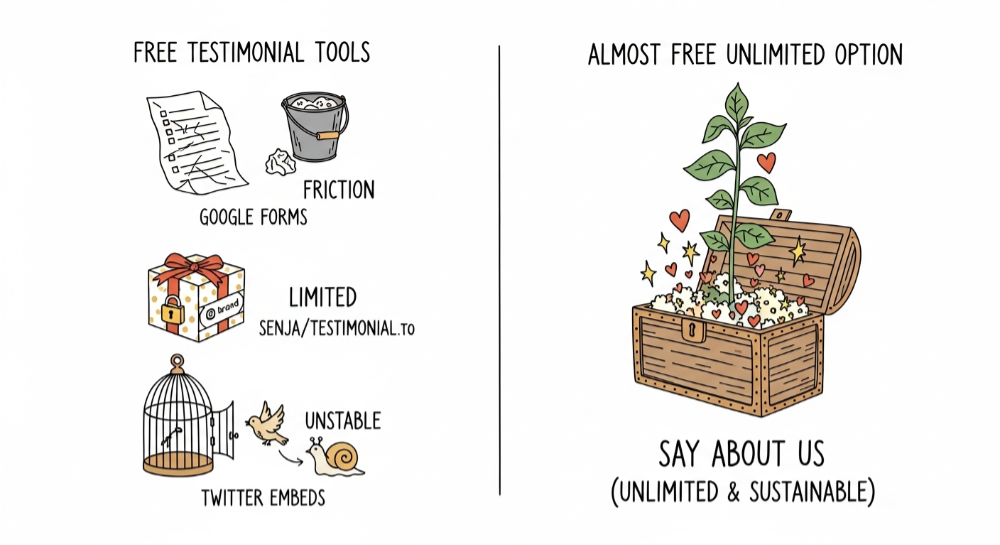
You are bootstrapping. Every dollar counts, and the idea of paying $30 a month for a "testimonial widget" feels absurd when you are still validating your idea. But you know social proof works. You have seen how a single good review can push a hesitant visitor over the edge.
So what are your options when your budget is zero?
Quick Comparison: Free Testimonial Tools
| Tool | Cost | Video Support | Branding | Limitations |
|---|---|---|---|---|
| Google Forms | Free | ❌ No | None | Manual everything |
| Senja Free | Free | Limited | Senja badge | 15 testimonials max |
| Testimonial.to Free | Free | 2 videos | Badge | 2 text + 2 video |
| Twitter Embeds | Free | ❌ No | Depends on tweets existing | |
| Notion + Embed | Free | ❌ No | Notion | Manual, limited styling |
| Carrd | Free | ❌ No | Carrd | 3 pages max |
| Say About Us | Free plan | ✅ Unlimited | None | None |
The Best Free Options (And Their Trade-offs)
1. Google Forms — The DIY Approach
The scrappiest option. Create a form with Google Forms, ask for a name, a photo, and a review. Copy-paste the responses onto your landing page manually.
How to set it up:
- Create a Google Form with fields: Name, Role/Company, Photo URL, Testimonial
- Share the form link with customers
- Manually copy responses to your website
Pros:
- Completely free forever
- You control all the questions
- No third-party branding
Cons:
- High friction for customers (they have to upload photos separately)
- Manual data extraction every time
- No video support
- Looks unprofessional without significant design work
- No embed widget — you are building from scratch
Best for: Pre-revenue founders who have time but no budget.
2. Senja (Free Tier)
Senja offers a free plan that lets you collect and display a limited number of testimonials with polished widgets.
What you get:
- Up to 15 testimonials
- Basic widget embed
- Text and limited video collection
Pros:
- Polished widget appearance
- Quick 5-minute setup
- Decent free tier for testing
Cons:
- Senja branding on widgets diverts attention from your site
- 15 testimonial cap — you will hit it fast
- Video quality and storage limited
- Forced upgrade once you grow
Best for: Founders testing if testimonials convert before committing to a paid tool.
3. Testimonial.to (Free Tier)
The market leader has a free entry point on Testimonial.to: 2 text testimonials and 2 video testimonials.
What you get:
- 2 text testimonials
- 2 video testimonials
- Basic widget
Pros:
- Industry-leading infrastructure
- Good video compression
- Reliable uptime
Cons:
- Extremely tight caps (4 total testimonials)
- Badge branding on free tier
- You will need to upgrade almost immediately
- Paid plans start at $20/month
Best for: Testing the platform before committing to their paid plans.
4. Twitter (X) Embeds — Free Social Proof
If customers are praising you on Twitter, embed the tweets directly on your landing page.
How to do it:
- Find the tweet
- Click "Embed Tweet"
- Paste the code on your website
Pros:
- Immediate authenticity — clickable profiles prove real people
- Completely free
- Shows organic praise, not solicited reviews
Cons:
- If they delete the tweet, it vanishes from your site
- Twitter embeds are heavy (50-100KB each) and slow your page
- No control over what they said
- Looks messy if you embed too many
Best for: Supplementing your testimonials page with organic social proof.
5. Notion + Embed — The Hacker Approach
Use Notion as a testimonial database and embed it on your site.
How to do it:
- Create a Notion database with columns: Name, Photo, Quote, Date
- Make the page public
- Use a tool like Super or Notion2Site to embed it
Pros:
- Free if you already use Notion
- Easy to update
- Can look decent with the right template
Cons:
- Notion branding unless you pay for Super ($16/month)
- Limited styling options
- Not designed for testimonials — feels hacked together
- No video support
Best for: Notion power users who want everything in one place.
6. Carrd — Simple Landing Pages
If your entire site is on Carrd, you can add testimonials directly in the builder.
Pros:
- Built into your existing workflow
- Free tier available
Cons:
- Limited to 3 pages on free tier
- No testimonial-specific features
- Manual updates only
- No video
Best for: Founders with simple Carrd landing pages.
What to Look For in a Testimonial Tool
Before choosing, ask yourself:
-
Do I need video? Video on landing pages can increase conversions by up to 80%, and video testimonials outperform plain text for most audiences. If the tool does not support video, you are leaving money on the table.
-
Will I hit the cap? Free tiers are designed to get you hooked. Calculate how many testimonials you will realistically collect in 6 months.
-
Does branding hurt me? A "Powered by X" badge on your testimonials sends visitors to a competitor's site. On a landing page optimized for conversions, that leak matters.
-
How much time am I spending? Manual tools (Google Forms, Notion) cost time. If you are spending 30 minutes per testimonial on data entry, that is not free — it is expensive.
The Alternative: Pay Less, Get More
Here is the thing about "free" tools: they are designed to get you hooked and then charge you. The free tier is the bait. The moment you need one more feature—remove branding, add video, exceed the cap—you are on a paid plan that costs $30 or more.
Say About Us starts free and scales as you grow. Unlimited testimonials on every plan. Sometimes the cheapest option is not free—it is just fair.
Start collecting Testimonials with Say About Us on the free plan — no credit card required.
 Ask ChatGPT
 Ask Claude
 Ask Perplexity
 Ask Grok